
Github Stars
Price range: $23.99 through $215.00Select options This product has multiple variants. The options may be chosen on the product page

Premium Github Stars
Price range: $47.99 through $323.99Select options This product has multiple variants. The options may be chosen on the product pageGitHub Boost Pack: Stars & Followers
Original price was: $67.83.$63.59Current price is: $63.59.
Buy GitHub Stars for Repositories ⭐
Quick reply
GitHub Stars are social proof
The more stars your repository has, the higher its credibility, visibility in search results, and interest from developers. This helps the project look alive, popular, and promising, especially at the start.The Boost Like service is simple and straightforward: choose a package → provide a link to the repository → stars are added gradually and safely, without bots and without requiring access to your account.

What you get with Boost Like: users and contributors will be attracted to your project faster, and attention to your project will increase.
The most common way to get stars is to ask for them. You can do this in many ways. You can ask for stars in your README.md file, on your website, in your Twitter bio, or in your email signature.
How do I find programmers on GitHub?
GitHub is a platform where developers collaborate on software projects to carry out or create software projects. GitHub Stars is a term we hear more and more these days, due to GitHub‘s growing popularity among job seekers!
Two programming principles of GitHub
To fully understand what GitHub is, you must understand two programming principles:
- Version Control and Git.
- Let’s delve into what these two principles are.
- Version control helps developers record and manage any changes to a project’s code. While Git is a distributed version control system, which means that all the code and its change history can be viewed by other developers within a team.
- According to the Stack Overflow Developer Survey, more than 87% of developers use GitHub. On GitHub, we can find tons of developers in this community, so this developer base may be your ideal candidate.
GitHub Stars for You – How to find programmers on GitHub
Let’s find programmers on GitHub
Step 1: Create your GitHub account
To access the developer base on GitHub you need to have an account within this social network. They will only ask you for an email, password, and username. Add a profile photo, your company name, and the link to your LinkedIn account. In this way, the developers you contact will be able to know and trust you faster.
Step 2: Use the search engine to find programmers
When you search for developers on GitHub you mainly use two parameters: location and language. Location is to indicate the developer’s location and language is to select the programming language.
For example, let’s look for all programmers in California by the location parameter. In the search engine write: “location: California”.
For example, our search brought us over 10,000 Github users in California. Which is a considerable base of developersconsidering that software development talent is scarce.
Now let’s use the “language” parameter to find Python programmers. In the search engine, we write “location: California language: Python”
For example, our search brought us more than 500 programmers in California who constantly contribute to Python software projects.
With location, you can also filter by cities such as: Los Angeles, San Diego, San Jose, among others.
Step 3: Filter correctly on GitHub
By default, GitHub sorts users by Best Match. With this filter, Github sorts the coders according to how much code they have written in the language we select. This is the best way to filter candidates according to the selected technology. You can also sort the candidates by more followers or with more repositories (code projects). As you already saw, in a matter of minutes we have found hundreds of developers.
Step 4: Know the candidate’s job
If these developers are skilled, they have probably already received dozens of job offers from other recruiters. To differentiate yourself from them, you must know a little more about the developer’s work.
If you tell the candidate that you have seen his work and mention some of his projects that you saw in his repositories, the candidate will be flattered and you will be able to connect with them faster.
How do I know about the candidate’s projects?
- Suppose we are in the developer profile.
- To know the code that he has written we click on Repositories.
- In this section, we can filter your code contributed to Github by: sources and forks, archived, and mirrors.
- The two most important that you are going to use to know the candidate code are sources and forks.
- The code listed as sources is code that the person has created himself. Whereas the repositories that say forked is code that the candidate has copied from another project to use in his because he considers it valuable.
- We click on the project we want to see.
- We go to the bottom of the page and we will find a brief description of the project in the ReadME section. To note, the code contains modules for managing inventory in warehouses. This code allows moving products from a location in the system and managing the catalog of products to link them.
How do stars affect a programmer’s profile?
The project sounds interesting, and it gives us a guide that the developer has done relevant projects within Github. I recommend you see the repositories that have stars. Stars are something that developers can give to another programmer’s code. They mean that the developer’s code has value to his colleagues.
It’s time to contact the candidate
In the candidate’s profile, we can only see their email. We have no other way to contact them. So the email we write you has to be very good to get your attention.
For your email to be successful, it should include the following points:
1. Presentation
To the candidate, you are a complete stranger who is contacting him in an invasive way. The least you can do out of cordiality is introduce yourself. Tell the candidate who you are, what your position is, what your company is, how you found their email and why you are contacting them.
2. Mention their work
In this part, mention which repository you found interesting about his work. This can be a great way to break the ice and let the candidate know that you took on the task of knowing about his work before contacting him. Which could be a compliment to the developer.
3. Description of the vacancy
In this part, you must put the requirements of the vacancy (technologies and frameworks). In this way, if the candidate does not meet the necessary technologies, he can discard himself and mention that perhaps he is not the right person for the vacancy. It is important that you tell the candidate the salary range. In this way, the candidate can tell you immediately if his desired salary is within your range. Thus, neither party wastes time.
Remember that the candidate is not directly applying for your vacancy. He wasn’t really looking for a job. So it is important that you be kind and honest with him and give him all the details of the vacancy. Don’t waste his time.
4. Company benefits
In this part, you must tell the candidate what your most interesting benefits are. Do you have a Home Office? flexible schedule? Snacks? Gym? comprehensive medical insurance? Practically this part is telling the candidate why he should work in your company.
How GitHub Stars Help Your Project Grow?
Do you now understand how to use GitHub to find developers for your projects?
GitHub stars show what developers like. If a repo has many stars, people notice it more.
More stars can also push your project higher in GitHub’s search results, which means more people might join in, try it out, and get involved.
How Our GitHub Stars Service Works ⚙️
Here’s how it works: pick the plan you want, give us your repo link, and we’ll start adding stars at a pace that looks real.
We only use real accounts, so things stay stable and safe. We don’t use bots or automated tools, and we’ll never ask for access to your GitHub account.
Benefits of Buying GitHub Stars ⭐
Buying GitHub stars can really help get your project off the ground by making a strong first impression. It can boost how visible you are, build trust, and get people more interested in what you’re doing.
When people see your repository has a lot of social proof, it’s easier to attract contributors, sponsors, and users, which gives your project a boost.
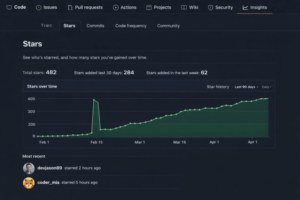
Case 1: Initial traction for an open-source repository
Project type: Open source developer tool.
Stage: Early stage / low visibility.
Goal: Make the repository active and attract the first contributors.
Before:
- 8 ⭐
- No organic traffic.
- No external contributors.
- What we did:
- Gradually added stars over 30 days.
- No bots, no account access.
- Natural growth without spikes.
After:
- 482 ⭐ total
- +284 ⭐ in the last 30 days
- The repository started appearing higher in GitHub search results.
- First organic stars and external interest appeared.
Result:
Stars did not replace organic growth, but helped create initial visibility and social proof. After reaching critical mass, the project began to attract attention naturally.
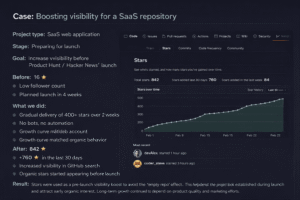
Case 2: Increasing visibility of a SaaS repository
Project type: SaaS web application
Stage: Pre-launch
Goal: Increase visibility before launch on Product Hunt / Hacker News
Before:
- 16 ⭐
- Low number of followers
- Launch scheduled in 4 weeks
- Repository appeared inactive to new visitors
What we did:
- Gradually gained over 400 stars in 2 weeks
- No bots, no automation
- No access to GitHub account
- Growth curve matched organic behavior
After:
- 842 ⭐ total
- +760 ⭐ in the last 30 days
- Increased visibility in GitHub search
- Organic stars started appearing before launch
Result:
Stars were used to increase visibility before launch to avoid the “empty repository” effect.
This helped the project appear established at launch and attract early organic interest. Long-term growth still depended on product quality and marketing efforts.
FAQ
Where do you buy your github stars?
On our site, you can buy GitHub Stars at affordable prices and in large quantities.
They will provide stars to your GitHub repository. It is a very powerful parameter that shows people like your repositories.
I need Github Stars fast. How can I buy GitHub Stars?
On our site you can buy github stars cheaply and in large quantities.
After you have made payment, you will be given access to a dashboard where you can provide us with your GitHub repository link.
Is it safe to buy GitHub stars?
Yes. Our service follows a natural delivery pattern and uses real accounts. We never use bots or automation, and we never ask for access to your GitHub account.
How quickly are GitHub stars delivered?
Delivery usually begins shortly after the order is confirmed. Stars are added gradually to make the growth look natural and stable.
Do I need to share my GitHub login or password?
No. We only need a public link to your repository. Your credentials are never required.
Will buying GitHub stars affect my repository?
No. When done correctly and gradually, GitHub stars do not harm your repository. No changes are made to your code, settings, or access rights.
Are the stars from real accounts?
Yes. Stars are added from real, active GitHub accounts to maintain authenticity and reduce risk.
Can I choose the number of stars?
Yes. We offer flexible packages so you can choose the number that fits your project and growth goals.
Is this service suitable for open source projects?
Yes. Many open source and early stage projects use stars to increase visibility and attract attention in the early stages of growth.
Will the stars remain forever?
The stars should remain stable. However, as with any social platform, over time, minor fluctuations may occur naturally.
Buy GitHub Stars
Buy GitHub stars safely from the best GitHub supplier of high quality and real users. Satisfaction guaranteed. Go viral on GitHub now!